

The Internet of Things is everywhere. In factories. In farms. In smart homes. Even in vending machines. Tiny devices collect data every second. But here’s the big question: How do you keep track of all of them? That’s where IoT device monitoring tools like ThingsBoard come in. They help you see what your devices are doing. In real time. From anywhere.
TLDR: IoT monitoring tools like ThingsBoard help you track device data and status in real time. They collect, store, and display information in easy dashboards. You can monitor performance, spot problems early, and even control devices remotely. These tools make managing thousands of devices simple and scalable.
Let’s break it down in a simple way.
What Is IoT Device Monitoring?
Table of Contents
Imagine you have 1,000 smart sensors in a warehouse. They measure:
- Temperature
- Humidity
- Motion
- Energy usage
If one sensor fails, how would you know?
You could walk around and check each one. That would take forever.
Or you could use an IoT monitoring platform. It shows all devices on one screen. If something breaks, you get an alert instantly.
That’s IoT monitoring in a nutshell.
Meet ThingsBoard
ThingsBoard is a popular open-source IoT platform. It helps businesses:
- Connect devices
- Collect data
- Visualize information
- Trigger alerts
- Control devices remotely
It’s like a mission control center for your smart devices.
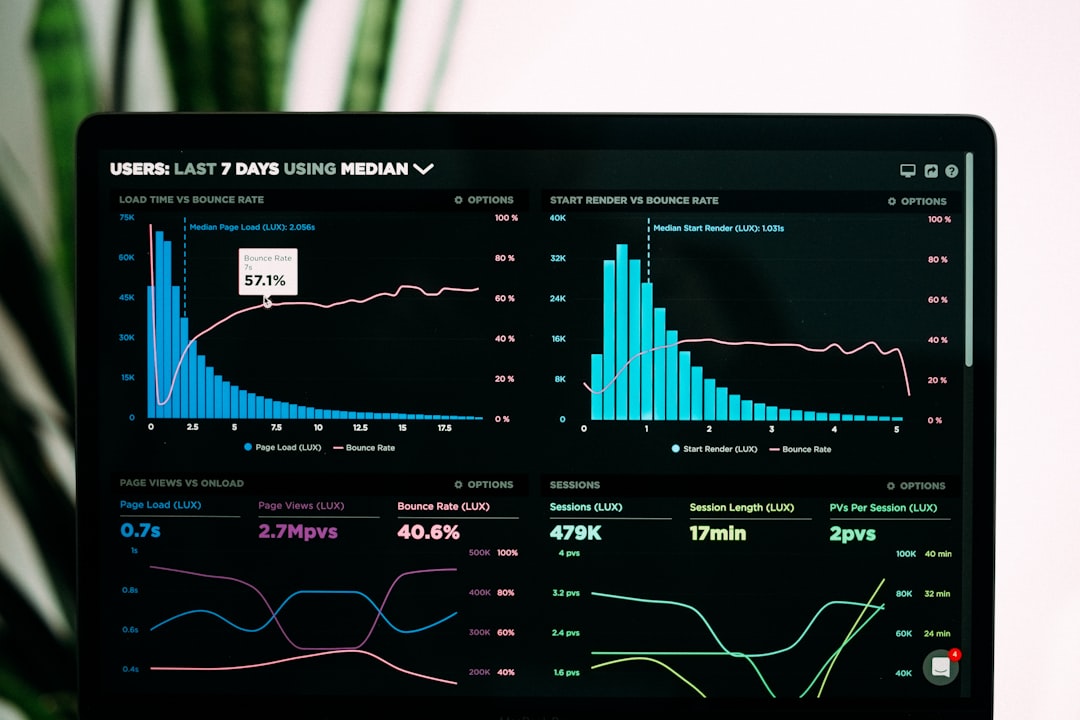
Everything appears in clean dashboards. You see charts. Gauges. Maps. Status lights. Simple and visual.
Why Monitoring Matters
Devices fail. Batteries die. Sensors drift out of calibration.
If you don’t monitor them, small problems become big ones.
Here’s why monitoring is important:
- Prevents downtime – Fix issues before they crash systems.
- Improves efficiency – Discover waste or overuse.
- Increases safety – Detect abnormal conditions quickly.
- Saves money – Reduce manual inspections.
Think of it like a fitness tracker. It constantly checks your steps and heart rate. ThingsBoard does that for machines.
How ThingsBoard Works
Let’s simplify the process.
- Devices send data.
- ThingsBoard receives it.
- The platform stores and analyzes it.
- You view it on a dashboard.
Devices can send data using common protocols such as:
- MQTT
- HTTP
- CoAP
This flexibility makes it easy to connect almost anything.
Real-Time Data Tracking
Real-time tracking is the magic part.
If a temperature sensor jumps from 20°C to 80°C, you see it instantly. No waiting. No guessing.
You can also:
- Set thresholds
- Create warning rules
- Send automatic notifications
For example:
If humidity drops below 30%, send an SMS to the maintenance manager.
That’s automation doing the heavy lifting.
Device Status Monitoring
Data is important. But status is critical.
You need to know:
- Is the device online?
- When was its last update?
- Is the battery low?
- Has it gone silent?
ThingsBoard shows device activity clearly. Green light means active. Red might mean offline.
This visibility gives peace of mind.
Dashboards That Make Sense
Data alone can feel overwhelming.
Thousands of numbers mean nothing without context.
That’s why dashboards matter.
ThingsBoard lets you build custom dashboards with:
- Line charts
- Bar graphs
- Pie charts
- Maps with device locations
- Status widgets
You drag and drop elements. No heavy coding required.
Each team can have its own dashboard. Engineers see technical stats. Managers see summaries.
Rule Engine: The Smart Brain
Here’s where it gets exciting.
ThingsBoard includes a rule engine. Think of it as a smart decision-maker.
It allows you to create logic like:
- If temperature rises above 50°C, trigger alarm.
- If device disconnects, send email.
- If vibration increases, schedule maintenance ticket.
This turns passive monitoring into active management.
Your system reacts automatically. You don’t have to constantly watch it.
Data Storage and History
Monitoring isn’t just about now. It’s also about then.
Historical data helps you:
- Spot patterns
- Predict failures
- Analyze trends
- Create reports
Maybe energy use spikes every Monday. Or machines overheat during summer.
With stored data, you can see these trends clearly.
Remote Device Control
Monitoring is powerful. But control is even better.
ThingsBoard allows remote commands.
You can:
- Restart a device
- Update firmware
- Change configuration settings
All from your laptop.
No site visit needed.
This is huge for companies managing devices across cities or countries.
Scalability: From 10 to 1 Million Devices
Many IoT projects start small.
Maybe 20 devices in one building.
But success means growth.
A good monitoring tool must scale easily.
ThingsBoard supports:
- Cloud deployment
- On-premise installation
- Hybrid environments
This flexibility lets businesses expand without rebuilding everything.

Security Matters
IoT devices can be targets.
So security is critical.
Monitoring platforms help by:
- Encrypting data
- Authenticating devices
- Managing user roles
- Tracking suspicious activity
You can control who sees what. Admins. Operators. View-only users.
This keeps sensitive data protected.
Industries That Use IoT Monitoring
IoT monitoring tools like ThingsBoard are used everywhere:
- Manufacturing – Monitor machines and prevent downtime.
- Agriculture – Track soil moisture and weather.
- Healthcare – Monitor medical equipment.
- Energy – Track solar panels and power grids.
- Logistics – Monitor vehicle fleets and shipments.
If something has a sensor, it can be monitored.
Benefits at a Glance
Let’s summarize the advantages:
- Real-time monitoring
- Instant alerts
- Custom dashboards
- Automation via rule engine
- Remote control
- Historical data analysis
- Scalable architecture
- Strong security features
That’s a powerful toolkit.
Is It Hard to Set Up?
Good question.
For small projects, setup is surprisingly simple. Especially with cloud hosting.
For large enterprise deployments, it requires planning. Architecture decisions matter. Database tuning matters.
But the platform is designed to grow with you.
Start small. Expand fast.
ThingsBoard vs Other IoT Monitoring Tools
There are many options out there. Some are fully managed cloud services. Others are lightweight dashboards.
ThingsBoard stands out because it:
- Is open-source
- Has a strong community
- Offers deep customization
- Supports advanced rule chains
Businesses can adapt it to their exact needs.
No one-size-fits-all limitations.
The Fun Part: Seeing Everything Come Alive
There’s something satisfying about watching live data flow across a dashboard.
Lines moving. Gauges shifting. Alerts popping up.
It feels like you’re running a high-tech command center.
But beyond the cool factor, the real value is control.
You stop reacting to problems.
You start preventing them.
Final Thoughts
IoT devices are only useful if you can understand their data.
Monitoring tools like ThingsBoard turn raw numbers into insights.
They help you track device health. Analyze performance. Automate responses. And scale confidently.
In a world filled with smart devices, visibility is power.
And with the right monitoring platform, you’re always in control.
Simple. Smart. Scalable.
That’s the beauty of IoT device monitoring.
