

In today’s fast-paced and tech-driven retail and service environment, businesses must rely on efficient and accurate systems to conduct sales, track inventory, and manage customer interactions. At the center of this digital transformation is the Point of Sale (POS) system, a tool that has evolved far beyond the simple cash register of the past.
TLDR
Table of Contents
A Point of Sale (POS) system is the hardware and software used by businesses to complete sales transactions, track inventory, and analyze performance. It combines components like cash drawers, receipt printers, barcode scanners, and digital interfaces that help retailers serve customers efficiently. Modern POS systems often function via the cloud and integrate with eCommerce, accounting, and customer management platforms. Understanding how POS systems work can help streamline operations, save time, and provide valuable business insights.
What Does POS Mean?
POS stands for Point of Sale. It refers to the location and the system used when a customer completes a purchase. While in the past this might have meant a countertop with a cash register, today, the term more broadly indicates a system that facilitates the entire checkout process, both physically in-store and online.
At its core, a POS system includes both hardware and software. These components collectively allow a business to:
- Process customer transactions
- Record sales data
- Manage inventory levels
- Generate purchase receipts
- Handle different forms of payment
Components of a POS System
Today’s POS systems are modular and sophisticated, consisting of several typical features and tools. Understanding each component clarifies how the system works and why it is essential.
1. POS Hardware
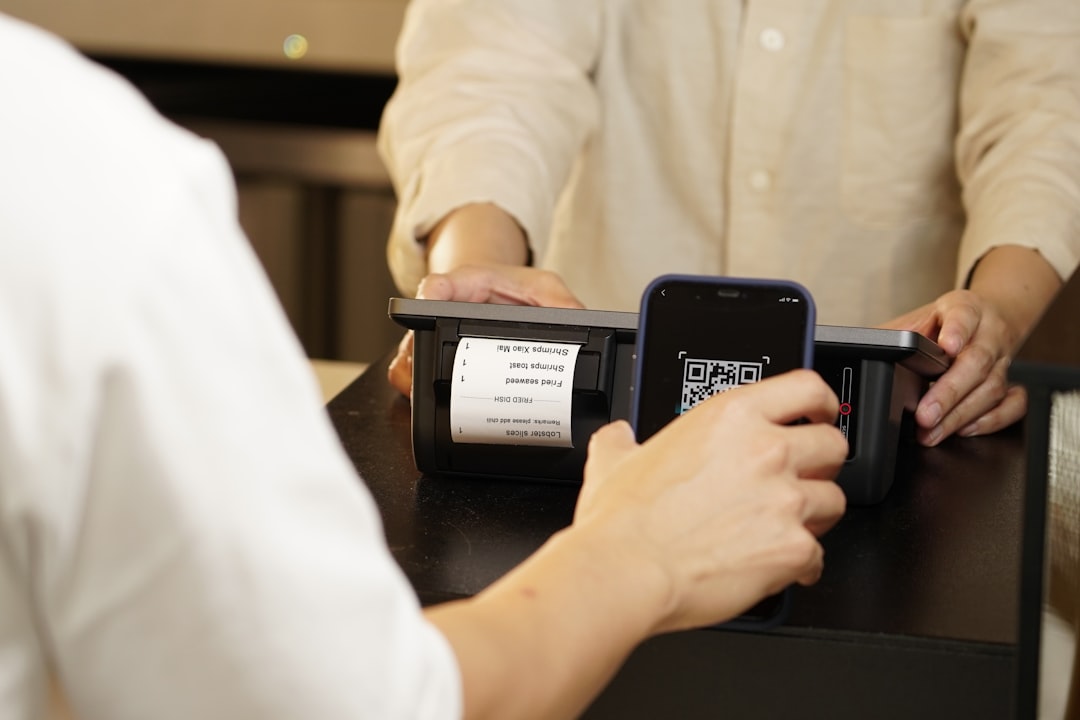
The physical equipment used in a POS system typically includes:
- POS Terminal: The computer or tablet where transactions are processed.
- Barcode Scanner: Used to input product information quickly and accurately.
- Receipt Printer: Issues purchase receipts to customers.
- Cash Drawer: Securely stores cash payments.
- Card Reader: Facilitates credit and debit card payments.
2. POS Software
Without software, hardware alone is ineffective. POS software performs behind-the-scenes functions, such as:
- Sales Tracking: Monitors real-time sales data and metrics.
- Inventory Management: Updates inventory count and alerts for low stock.
- Customer Relationship Management (CRM): Captures customer info to help with personalized service and promotions.
- Employee Management: Tracks employee performance, hours worked, and sales data.
- Analytics & Reporting: Provides business insights through detailed reporting tools.
Some advanced systems offer cloud-based software, allowing access from multiple devices and locations, ideal for business owners managing multiple outlets.
Types of POS Systems
POS systems are designed to serve different kinds of businesses. Below are some popular implementations:
1. Traditional POS Systems (On-Premise)
These setups involve installing software directly on local computers or servers within the store. While reliable, they often require more expensive upfront investments and cannot be accessed remotely.
2. Cloud-Based POS Systems
These are accessed through the internet and offer real-time updates, remote monitoring, and seamless software updates. They are popular among small to mid-sized businesses because of their flexibility and lower initial costs. The rise of SaaS (Software as a Service) platforms has made cloud-based systems widely accessible to retailers and restaurants alike.
3. Mobile POS (mPOS)
Mobile POS solutions enable businesses to accept payments using smartphones or tablets. This solution is increasingly used in pop-up shops, sidewalk sales, food trucks, and field services. It minimizes hardware needs and offers flexibility.
Common examples include Square, Clover, and Toast.

Industries That Rely on POS Systems
Almost every customer-facing industry can benefit from a tailored POS system. Here are just a few examples:
- Retail: Tracks inventory, manages returns, and generates daily sales reports.
- Hospitality: In restaurants, POS systems take orders, split bills, and manage tables.
- Health & Wellness: Salons and gyms use POS software for appointment booking and subscription billing.
- eCommerce: Online retailers use integrated POS systems to manage both digital and in-store sales.
Benefits of Using a POS System
Implementing a robust POS system offers multiple advantages, including:
- Efficiency and Speed: Checkout times are accelerated with automation and scanning tools.
- Inventory Control: Real-time tracking allows businesses to reorder supplies intelligently.
- Data Accuracy: Reduces human error by automating sales entry and updating databases.
- Improved Customer Experience: Personalized service based on past purchasing behavior and quicker checkouts.
- Comprehensive Reporting: Business owners can use reports to forecast trends, plan promotions, and track performance.
For businesses striving to be competitive in a digital age, these tools are no longer optional—they are critical assets.
Choosing the Right POS System
Selecting the right POS system requires evaluating your goals, business size, and budget. Here are important factors to consider:
- Compatibility: Ensure the software integrates with other systems you use (e.g., accounting, CRM, eCommerce).
- Ease of Use: User interface and training requirements vary; choose a system your staff can quickly adapt to.
- Cost Structure: Consider software subscription fees, hardware costs, and potential transaction processing rates.
- Scalability: As your business grows, your POS should be able to support new locations, employees, and features.
- Customer Support: Choose a provider known for responsive and knowledgeable support services.
Future Trends in Point of Sale Systems
POS technology continues to innovate rapidly. Trends to watch include:
- Artificial Intelligence (AI): AI assists with predictive sales analytics, staffing forecasts, and targeted marketing.
- Omnichannel Integration: A unified system that syncs in-store experiences with online sales platforms.
- Contactless and Mobile Payments: The demand for secure and hygienic payment solutions continues to rise.
- Advanced CRM Tools: POS systems will become even more sophisticated in customer tracking, enabling hyper-personalized service offerings.
Staying ahead of these developments can help businesses make informed investments and remain competitive in ever-evolving markets.

Conclusion
Understanding the true meaning of POS and how these systems work is more than a technical exercise—it is a strategic move toward improving business operations, enhancing customer satisfaction, and unlocking the potential for sustainable growth. Today’s POS systems serve as central hubs for data, analytics, inventory, and customer engagement. Whether you run a boutique retail shop or a chain of restaurants, the right POS system can make a measurable impact on your bottom line. Make your choice wisely, and leverage POS technology to elevate your business operations.
